AI Hair Try On & Color Changer
- 4.7
- Rating
- 10.00K
- Installs
- Free
- Price

 Analysis by App-foxy
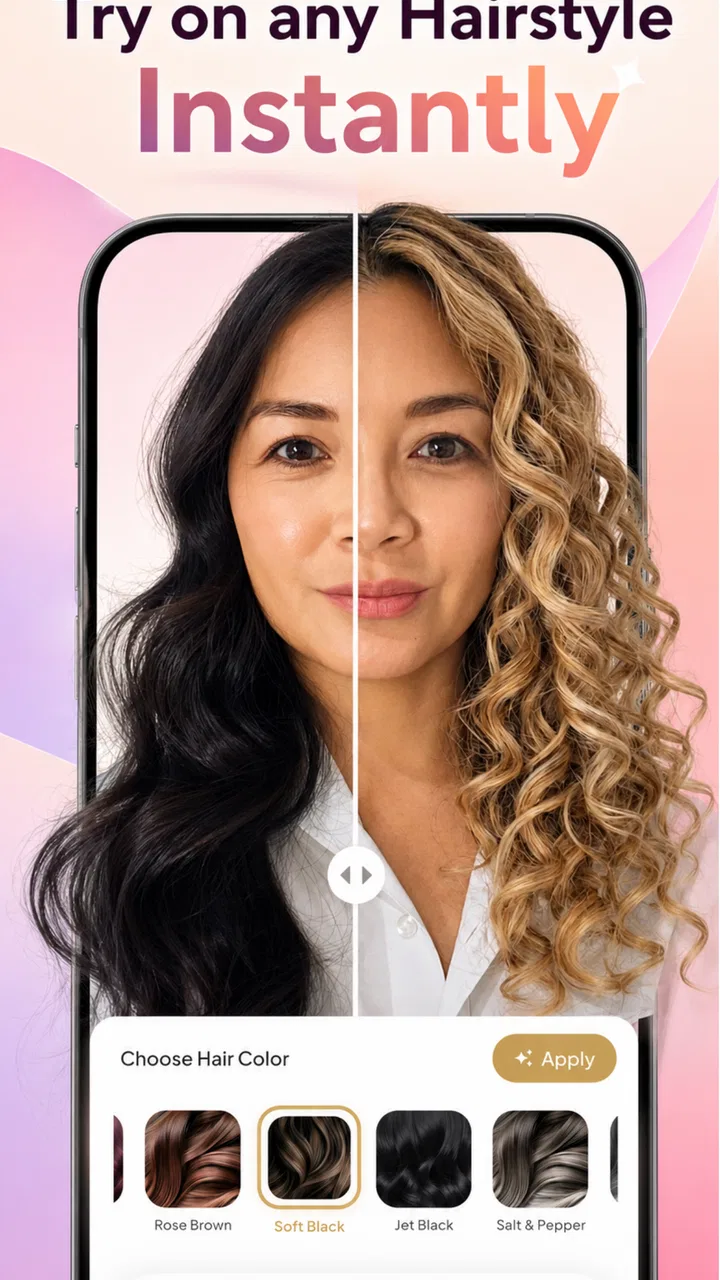
I approached AI Hair Try On & Color Changer as a practical beauty tool rather than a replacement for a stylist. Its purpose is simple: let me preview different hairstyles, hair colours, and cuts before I make a real-world decision. That makes it most interesting for people who like experimenting but want a visual checkpoint before booking an appointment, buying dye, or showing a reference photo to a hairdresser.
In my experience, the appeal is not just changing a colour on a picture. The useful part is turning a vague idea into something I can compare. A name such as “warmer brown” or “shorter layers” can mean very different things from one person to another. Seeing several possibilities side by side gives me a clearer way to decide what I actually like.
This is a free beauty app from Dream Prayer Developer, with optional in-app purchases priced from $3.99 to $14.99 per item. It is rated for Everyone, runs on Android 7.0 or later, and the current release is version 1.0.12. The app has a 4.3 average from around 279 ratings, with 10K+ installs, so it has attracted a modest but visible audience rather than presenting itself as an established salon platform.
You May Also Like

 Pandora - Music & Podcasts
Pandora’s Music Is Easy to Start, but Harder to Recover
Pandora’s strength is its low-effort path from a seed to a station. Its weak spot is how much confidence it asks you to place in connection, setup, and quiet recovery.

 AccuWeather: Weather Radar
AccuWeather Review: A Quick, Clear Forecast for Everyday Decisions
For everyday plans, the best forecast is the one you can understand quickly. AccuWeather makes rain timing, radar, and local conditions easy to act on, with a few trade-offs.

 Hill Climb Racing
Why Hill Climb Racing Still Turns Crashes Into One More Run
A tiny car, a bumpy hill and one more upgrade: Hill Climb Racing keeps resurfacing because its simple chaos makes every near-miss feel personal.

 AliExpress - Shopping App
AliExpress Makes Global Shopping Feel Personal, but Shoppers Bear the Risk
AliExpress turns a global marketplace into a pocket-sized discovery engine. Its reach is useful, its shopping loop compelling, and its trade-offs easy to miss.

 Lords Mobile: Kingdom Wars
Lords Mobile Is a Kingdom-Building Routine, Not a Quick Match
A case-by-case verdict on the building, battles, device demands, and social commitments that make Lords Mobile rewarding for some players and exhausting for others.

 PDF Scanner app - TapScanner
TapScanner Makes Paperwork Easier to Capture, Check, and Share
TapScanner makes scanning with a phone feel less like a rescue operation and more like a dependable step in getting work done. Its capture tools are useful, though not flawless.
More From Our News Desk
View All News


What the try-on experience is really useful for
I use the try-on stage to turn a broad idea into a choice I can explain, rather than to hunt for a perfect prediction. One useful habit is to write down what I like about each candidate—its shape, tone, or overall feel—before moving on, so the final comparison reflects my priorities instead of whichever image catches my eye last. That makes the next step, building a repeatable workflow, much clearer.
A low-risk first step before changing your appearance
The strongest use case is early decision-making. If I am considering a new cut but cannot explain it well, a visual preview helps me narrow the conversation. I can decide whether I am drawn to a dramatic change, a subtle adjustment, or simply a different colour tone. That is more useful than scrolling through unrelated inspiration images because the result is placed in the context of my own face and overall look.
I would use it before a salon visit in a very specific way. First, I would make a small set of previews rather than generating endless variations. Then I would keep the options that still look appealing after a few minutes away from the screen. Finally, I would show the preferred image to a stylist while explaining that it is only a reference. This last step matters because an edited preview cannot account for hair texture, density, growth patterns, maintenance time, or the condition of the hair.
It can also help with colour conversations. Someone who says “I want blonde” may actually prefer a muted beige, a warmer honey shade, or a cooler result. Trying nearby options can reveal that preference. I see this as one of the app’s more practical benefits: it supports better communication, even when the final salon result will naturally differ.
Where an AI preview needs careful interpretation
I would not treat the image as a promise of what a haircut or dye job will look like. Hair is three-dimensional, while a phone preview is based on a flat image. Lighting, camera angle, existing colour, curls, highlights, and hairline shape can all affect the impression. A shade that looks balanced in one photo may look much stronger in daylight or against a different outfit.
The most reliable comparisons come from keeping the source photo consistent. I would use one clear image with the face visible, a reasonably natural expression, and hair that is not hidden by a hat or heavy filter. If I change the photo between options, it becomes difficult to tell whether I prefer the hairstyle or simply prefer the lighting in one image.
There is a useful trade-off here. A highly polished preview may be more exciting, but a more ordinary photo can be more honest for planning. I would rather use an image that resembles how I normally appear than one that already includes strong makeup, dramatic lighting, or a beauty filter. The goal is not to create the most flattering picture; it is to make a decision I will still like outside the app.
My recommended workflow for comparing styles
I found that the app makes more sense when used as a short decision workflow instead of a casual stream of random changes. I would begin with the kind of change I am genuinely considering, then compare only a few nearby alternatives. For example, if I am thinking about a shoulder-length cut, I would compare a slightly shorter version, a softer layered version, and one more dramatic option. That creates a useful range without making the choice feel chaotic.
A second helpful technique is to separate shape from colour. I would first decide whether the haircut suits the look I want, then test colours on the preferred shape. Changing both at once can make it hard to understand what is attracting me. A bold colour may distract from a cut I do not actually like, while a striking cut may make an ordinary colour seem more interesting than it is.
I would also save my preferred result outside the moment of experimentation if the app gives me a way to do so through the visible controls. Keeping a small comparison set is more useful than collecting dozens of nearly identical images. This is one of the less obvious lessons with try-on tools: too many choices can reduce confidence instead of improving it.
Who will get the most value from it
The app is a good fit for someone who is curious about a change but hesitant to commit. It is especially suitable for people preparing for a salon consultation, comparing colour families, or trying to describe a style to a friend. It can also be useful when a person is deciding whether a familiar look has become too repetitive and wants a quick visual nudge toward something different.
It is less suitable for someone who needs technical hair advice. If the important question is whether damaged hair can safely handle bleaching, whether a particular cut works with a strong curl pattern, or how much daily styling will be required, a preview cannot answer that. A professional stylist, a colourist, or a detailed consultation is the better choice in those situations.
I would also skip relying on it for an exact colour match. Digital displays vary, and the final result depends on the starting shade and the products used. The app can help me identify a direction, but it should not replace a strand test or a professional assessment when the change is significant.
Trust starts with visible choices, not just attractive results
Because this kind of app works with personal photos, I pay attention to the moments where I am asked to choose something. Before using it regularly, I would read each permission prompt carefully and grant only what is needed for the action I am trying to perform. I would not approve access automatically just because the app is free or because the preview looks convincing.
The same approach applies to account controls and any purchase screen. I would look for clear wording around what I am selecting, whether a feature is part of the free experience, and whether an item has a one-time cost. The available in-app purchase range is from $3.99 to $14.99 per item, so I would pause before confirming anything and make sure the price belongs to the exact option I intend to use.
I also prefer to test the basic flow before paying. The free download lowers the barrier to trying the app, but “free” does not mean every tool or result is necessarily included without charge. A sensible approach is to see whether the core preview process fits my needs first, then decide whether an optional purchase adds enough value to justify it.
For privacy, my most cautious moments would be selecting a personal photograph, responding to a permission request, and deciding whether to keep or share a generated image. I would avoid using photos that include other people unless they have agreed, and I would choose a picture that does not reveal unnecessary personal details in the background. These are simple habits, but they give me more control regardless of which beauty app I use.
How it compares with ordinary alternatives
The usual alternative is searching image boards, salon galleries, or social media for examples. Those sources are better for seeing real hair in different textures and lighting, but they do not show how a particular idea may work with my face. This app offers the opposite advantage: personal context, with less real-world variety.
A salon consultation is still stronger for technical judgement. A stylist can examine the hair directly, discuss upkeep, adjust the idea to suit the person, and explain what is realistic in one appointment. The app is faster and more private for initial exploration, but it lacks that professional feedback. I would use both in sequence rather than treating them as competing choices.
Manual editing apps can also change hair colour, but they often require more patience and control. They may be better for someone who wants to adjust a precise area or create a polished social image. For a quick hairstyle decision, an AI-focused tool is more convenient. The trade-off is that convenience can hide small inaccuracies, so I would judge the overall impression rather than inspect every strand as if it were a technical simulation.
Small habits that make the results more useful
One practical tip is to test a familiar option first. If the preview cannot represent a style I already know well, I would be cautious about trusting its more radical suggestions. A familiar haircut or colour gives me a reference point for how believable the transformation feels on my photo.
Another is to compare the result at normal phone brightness and in ordinary indoor light. A colour that looks appealing at maximum brightness may not feel as wearable in daily conditions. I would also look at the image after a break rather than making a decision during the excitement of rapid experimentation.
A third is to think about maintenance before falling for the image. A dramatic colour may require frequent appointments or careful home care, while a particular cut may need daily styling. The preview helps with appearance, but I still need to ask whether I want the routine that comes with it. That distinction is important: liking a look and wanting to live with it are not the same thing.
What I would check before making it part of my routine
I would begin by confirming that my device meets the Android 7.0 minimum requirement. After installing, I would review the available controls one at a time and notice which actions are available without a purchase. I would keep the first test simple, using a suitable photo and a modest change, because that gives me a fair impression of the experience without mixing too many variables.
I would also keep expectations realistic about speed and consistency. AI image tools can be enjoyable when the result is close to the idea, but a preview is not automatically useful just because it is visually striking. If an output changes facial details too much or makes the hair look disconnected from the head, I would discard it rather than trying to rationalize the result.
For anyone sharing images, I would make that decision deliberately. A private planning image and a public social post serve different purposes. If I only need help choosing a haircut, there is no reason to share more broadly than necessary. If I do share, I would check the image for background details and other people before posting it.
My cautious verdict
After looking at it as a beauty decision aid, I think AI Hair Try On & Color Changer is most valuable as a conversation starter. It can turn uncertainty into a few concrete options, help me discover which colour family I prefer, and make a salon discussion less vague. Its free entry point makes that initial experiment easy, while the optional purchases mean I should review each paid choice rather than tapping through automatically.
I would recommend it to curious users who understand the difference between a visual mock-up and professional hair advice. I would not recommend using it as the sole basis for bleaching, a major cut, or any decision involving hair health. The best results come from combining a consistent photo, a limited comparison set, and a willingness to treat the output as inspiration instead of a guarantee.
My final view is positive but measured. The app has a clear everyday purpose, and its strongest feature is the ability to make a personal style idea easier to discuss. Its main limitation is inherent to the format: a generated image cannot fully reproduce real texture, lighting, movement, or maintenance. If I keep that boundary in mind, the tool earns a place in the early planning stage of a beauty change, especially when I want to explore possibilities without committing immediately.
FAQs for AI Hair Try On & Color Changer
01What is AI Hair Try On & Color Changer, and how does it work?
AI Hair Try On & Color Changer is a virtual hairstyle and hair-color preview app that uses artificial intelligence to modify a photo of your face. After uploading or taking a picture, you can test different cuts, styles, shades, and color combinations before visiting a salon. Results depend on image quality, lighting, facial angle, and how clearly your hair is visible.
02Can I try realistic hairstyles and hair colors before changing my appearance?
Yes, the app is designed to help you preview possible changes, including different haircuts, lengths, textures, and colors. In my experience, natural-looking results are usually easier to achieve with a front-facing, well-lit portrait and loose hair. The previews should be treated as visual inspiration rather than an exact prediction, since real hair texture, volume, and styling may produce different results.
03Is AI Hair Try On & Color Changer free to download and use?
The application may be available to download for free, but some features can be restricted behind in-app purchases or a subscription. Premium access may include additional hairstyles, advanced color options, higher-quality exports, or an ad-free experience. Before starting a trial or confirming payment, check the current pricing, renewal terms, and cancellation instructions shown in the app store.
04Does the app require my photos or personal information to work?
To create a hairstyle preview, the app needs access to a photo, either from your device gallery or your camera. Permission requests can normally be managed through Android or iOS privacy settings. Because policies may change, review the app’s privacy statement to understand whether images are processed on the device, uploaded to servers, stored temporarily, or used to improve its AI features.
05Can I save and share the hairstyle results with a hairstylist or friends?
After generating a preview, users can generally save the edited image to their device or share it through supported apps such as messaging platforms and social networks. This makes it useful for comparing several looks or showing a stylist your preferred direction. Keep in mind that the final image is an AI simulation, so discuss color maintenance, haircut suitability, and realistic expectations with a professional before making a change.
Pros
- Lets you preview cuts and colors before visiting a salon.
- Offers quick experimentation without using real dye or scissors.
- Useful for comparing bold shades with more natural hair colors.
- Simple visual tool for sharing makeover ideas with friends or stylists.
- Can inspire hairstyle changes when you are unsure what suits you.]
- contras:[
- Results may look unrealistic with poor lighting or unclear photos.
- Some hairstyles may fit awkwardly around faces or hairlines.
- Color previews may differ noticeably from real salon results.
- Advanced styles or features may require in-app purchases.
- Uploading personal photos can raise privacy concerns for some users.
Cons
- Results may look unrealistic with poor lighting or unclear photos.
- Some hairstyles may fit awkwardly around faces or hairlines.
- Color previews may differ noticeably from real salon results.
- Advanced styles or features may require in-app purchases.
- Uploading personal photos can raise privacy concerns for some users.

AI Hair Try On & Color Changer
Gallery